vue 常用技巧
1、elementui日期选择器,只能选给定日期的区间
<el-form-item label="发票开具日期" prop="receiptTime">
  <el-date-picker
    v-model="formData.receiptTime"
    type="date"
    placeholder="选择日期"
    style="width:100%"
    format="yyyy 年 MM 月 dd 日"
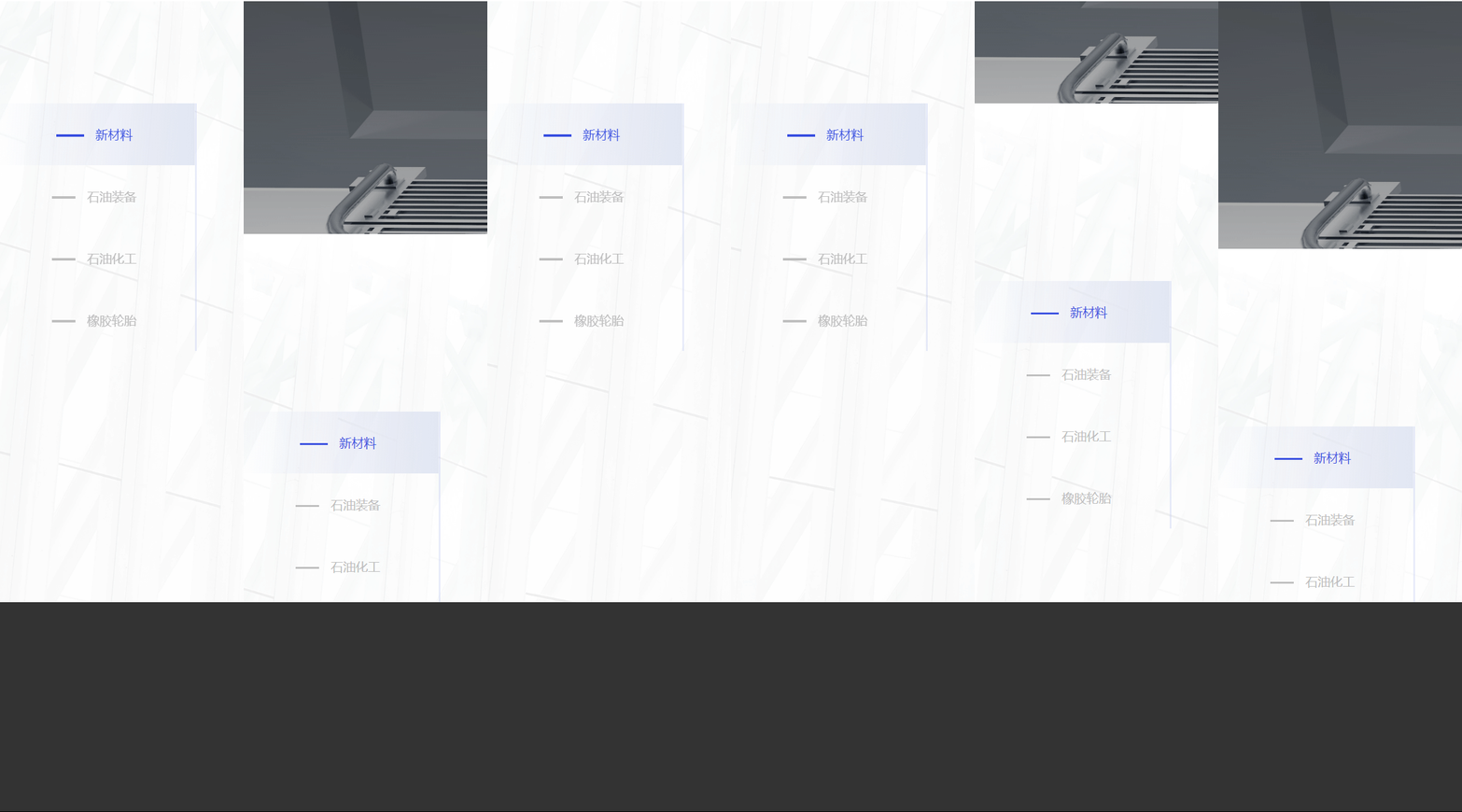
    value-format="yyyy-MM-dd"
    :picker-options="pickerOptions"
  >
  </el-date-picker>
</el-form-item>
<script>
  export default {
    data() {
      return {
        pickerOptions: {
          disabledDate(time) {
            var sdate = new Date("2022-06-09".replace(/-/g, "/"));
            var edate = new Date("2022-06-30".replace(/-/g, "/"));
            return (
              time.getTime() > edate.getTime() ||
              time.getTime() < sdate.getTime()
            );
          },
        },
      };
    },
  };
</script>2、img可左右旋转
<el-dialog
  :visible.sync="viewPicShow"
  top="30px"
  :title="picTitle"
  height="800px"
  width="850px"
  class="imgDialog"
>
  <el-image
    id="imageDisplay"
    style="width: 100%; height: 100%"
    :src="picUrl"
    fit="contain"
  >
  </el-image>
  <i class="el-icon-refresh-left" @click="turn('left')"></i>
  <i class="el-icon-refresh-right" @click="turn('right')"></i>
</el-dialog>
<script>
  export default {
    methods: {
      turn(v) {
        if (v == "right") {
          this.degree += 90;
        } else {
          this.degree -= 90;
        }
        document.getElementById("imageDisplay").style.transform =
          "rotate(" + this.degree + "deg)";
      },
    },
  };
</script>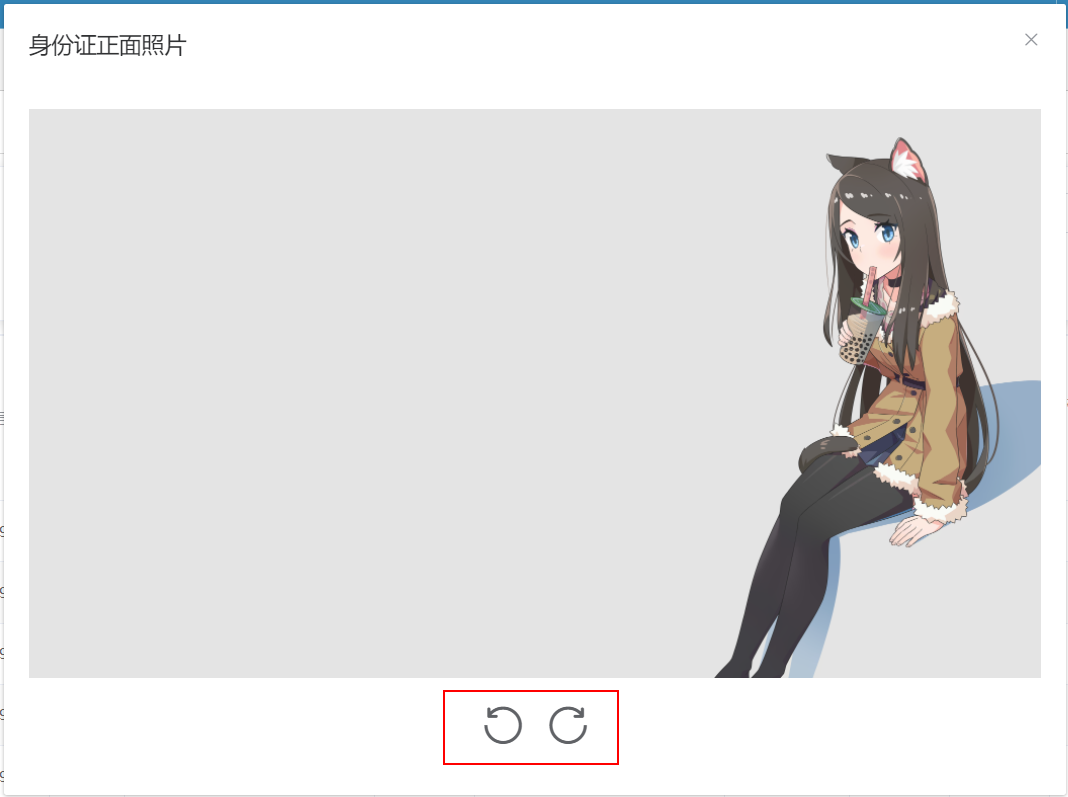
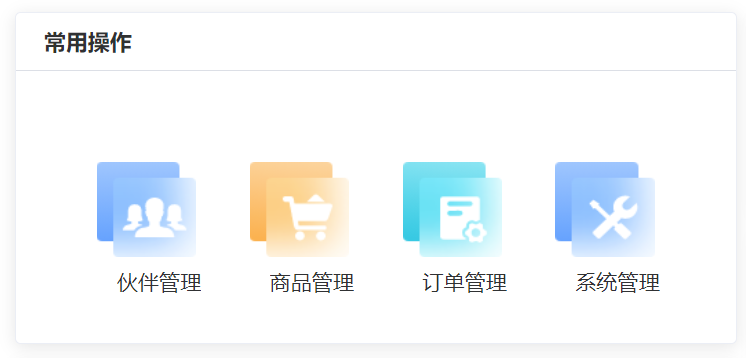
3、vue 通过函数动态绑定 Class 属性
<div class="content-info">
  <div class="item" :class="getBg('partner')">
    <span class="desc">伙伴管理</span>
  </div>
  <div class="item" :class="getBg('product')">
    <span class="desc">商品管理</span>
  </div>
  <div class="item" :class="getBg('order')">
    <span class="desc">订单管理</span>
  </div>
  <div class="item" :class="getBg('system')">
    <span class="desc">系统管理</span>
  </div>
</div>

<script>
  methods:{
      getBg(item) {
          switch (item) {
              case "partner":
                  return "partner-bg";
              case "product":
                  return "product-bg";
              case "order":
                  return "order-bg";
              case "system":
                  return "system-bg";
          }
      }
  }
</script>

<style lang="less" scoped>
  .content-info {
    justify-content: space-evenly;
    align-items: center;
    .partner-bg {
      background: url("~@static/img/workspace/console_yunying_caozuo_huoban.png")
        no-repeat center center;
      background-size: 100% 100%;
    }
    .product-bg {
      background: url("~@static/img/workspace/console_yunying_caozuo_sp.png")
        no-repeat center center;
      background-size: 100% 100%;
    }
    .order-bg {
      background: url("~@static/img/workspace/console_yunying_caozuo_dingd.png")
        no-repeat center center;
      background-size: 100% 100%;
    }
    .system-bg {
      background: url("~@static/img/workspace/console_yunying_caozuo_xitong.png")
        no-repeat center center;
      background-size: 100% 100%;
    }
  }
</style>
效果图:
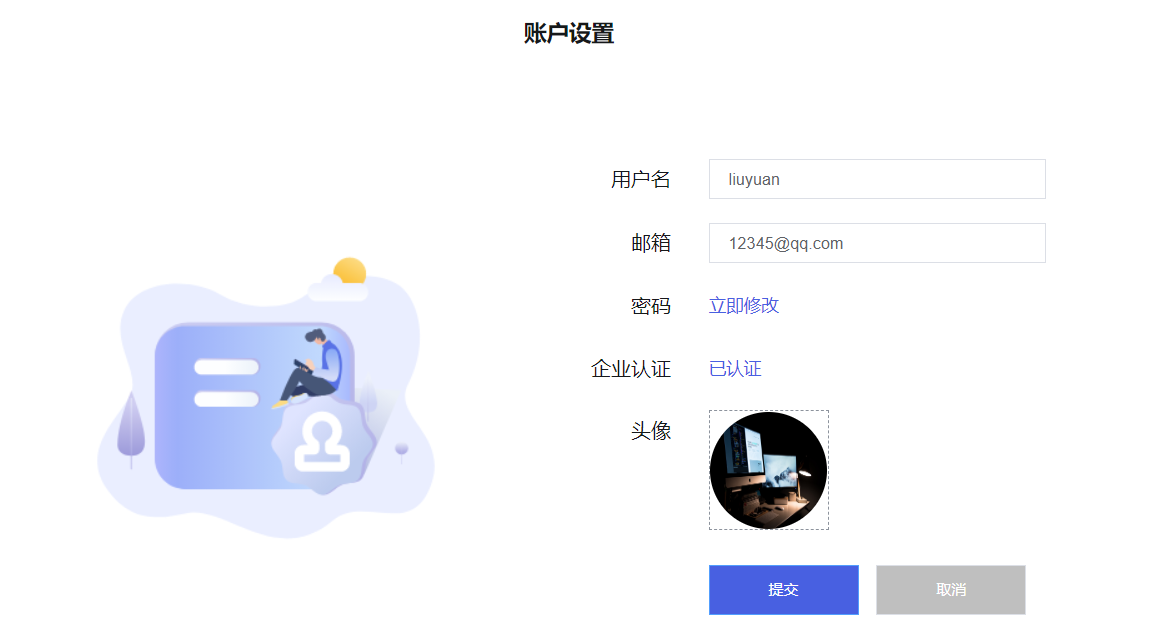
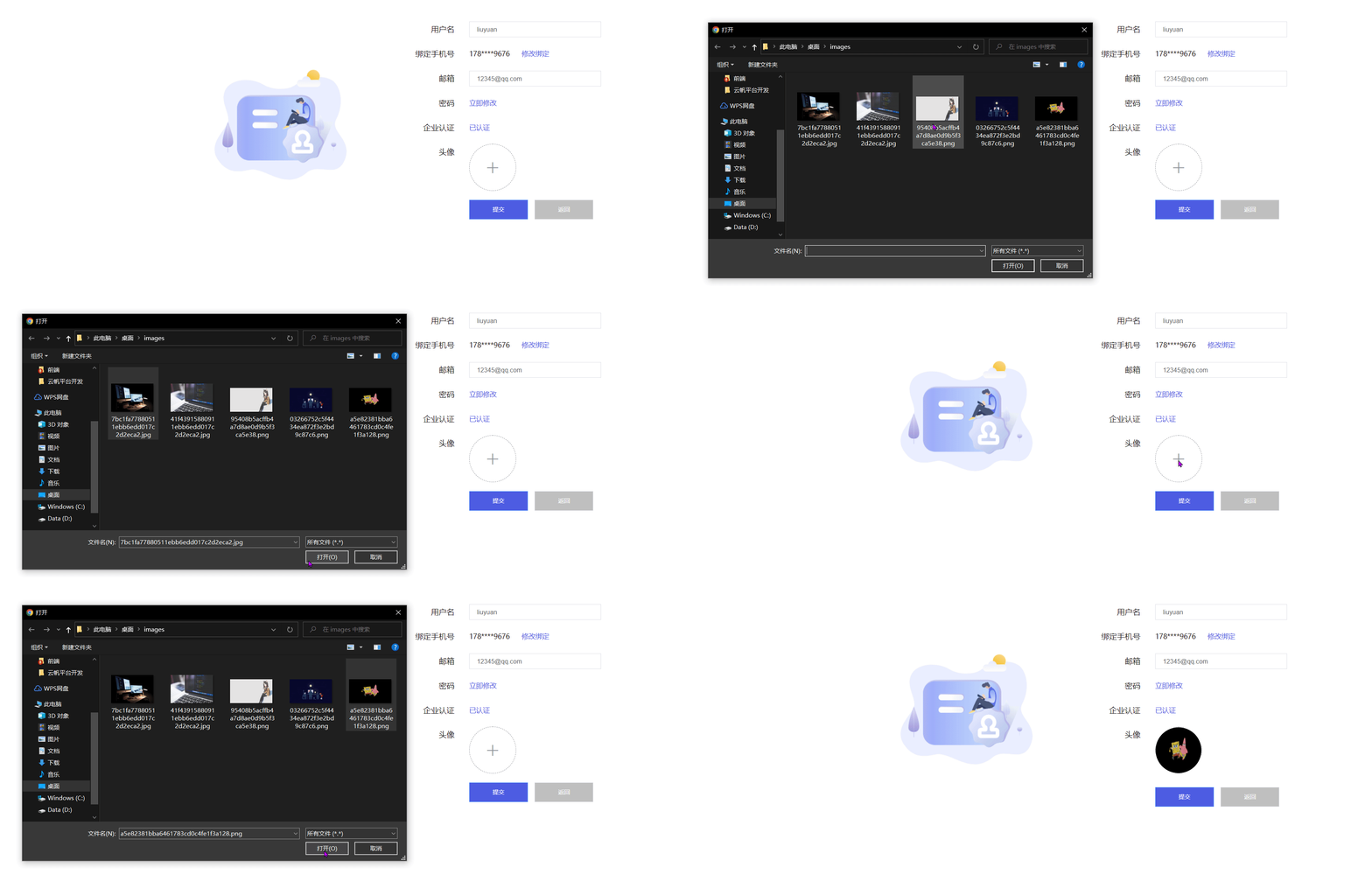
4、element 实现图片上传
(值得学习的小技巧:before-upload="(file) => beforeAvatarUpload(file,
'idBack')")
<el-form-item label="头像">
  <el-upload
    :action="'/backend/v1/user/uploadFile/'+userId"
    :show-file-list="false"
    :on-success="handleSuccess"
    :before-upload="(file) => beforeuserDescUpload(file, 'userDesc')"
  >
    <img
      class="userDescImg"
      v-if="accountFormData.userDesc"
      :src="'/backend/v1/user/viewPic?pic='+accountFormData.userDesc+'&id='+userId"
    />
    <i v-else class="el-icon-plus userDesc-uploader-icon"></i>
  </el-upload>
</el-form-item>

<script>
  data(){
      return{
          accountFormData: {  userDesc: "" },
          userDescUrl: "",
      }
  }
  methods:{
      beforeuserDescUpload(file, t) {
          // this.accountFormData[t] = "";
          const isJPG = file.type === "image/jpeg";
          const isPNG = file.type === "image/png";
          if (!isJPG && !isPNG) {
              this.$message.error("上传图片只能是 JPG/PNG 格式!");
          }
          return isJPG || isPNG;
      },

          handleSuccess(response, file) {
              this.accountFormData.userDesc = response.data;
              this.userDescUrl = URL.createObjectURL(file.raw);
              // window.open(this.userDescUrl);
          },
  }
</script>

<style lang="less" scoped>
  .userDesc-uploader-icon,
  .userDescImg {
    font-size: 28px;
    color: #8c939d;
    width: 94px;
    height: 94px;
    line-height: 94px;
    text-align: center;
    border-radius: 50%;
  }
  /deep/ .el-upload {
    border: 1px dashed #8c939d;
    width: 94px;
    height: 94px;
  }
</style>
效果图:
优化:
<el-form-item label="头像">
  <el-upload
    :action="'/backend/v1/user/uploadFile/'+userId"
    :show-file-list="false"
    :on-success="handleSuccess"
    :before-upload="(file) => beforeuserDescUpload(file, 'userDesc')"
  >
    <ul
      class="el-upload-list el-upload-list--picture"
      v-if="accountFormData.userDesc"
    >
      <li tabindex="0" class="el-upload-list__item is-success">
        <img
          class="userDescImg "
          :src="'/backend/v1/user/viewPic?pic='+accountFormData.userDesc+'&id='+userId"
        />
        <span class="el-upload-list__item-actions">
          <i
            class="el-icon-close el-myicon-close"
            @click.stop="handleRemove"
          ></i>
        </span>
      </li>
    </ul>
    <i v-else class="el-icon-plus userDesc-uploader-icon"></i>
  </el-upload>
</el-form-item>

<style lang="less" scoped>
  .userDesc-uploader-icon,
  .userDescImg {
    font-size: 28px;
    color: #8c939d;
    width: 94px;
    height: 94px;
    line-height: 94px;
    text-align: center;
    border-radius: 50%;
  }
  /deep/ .el-upload {
    border: 1px dashed #8c939d;
    width: 94px;
    height: 94px;
    position: relative;
    border-radius: 50%;
  }

  .el-upload-list {
    height: 100%;
    width: 100%;
    display: flex;
    justify-content: center;
    align-items: center;
  }
  .el-upload-list--picture .el-upload-list__item {
    overflow: hidden;
    z-index: 0;
    background-color: #fff;
    border-radius: 0;
    box-sizing: border-box;
    border: none;
    margin-top: 0;
    padding: 0;
    height: 94px;
    width: 94px;
  }

  .el-upload-list__item .el-myicon-close {
    display: none;
    // display: inline-block;
    position: initial;
    // top: 2px;
    // right: 2px;
    // top: 50%;
    // right: 50%;
    cursor: pointer;
    opacity: 1;
    color: #fff;
    &:hover {
      color: #fff;
    }
  }
  .el-upload-list__item:hover:nth-child(1) .el-icon-close {
    display: inline-block !important;
  }

  .el-upload-list__item .el-upload-list__item-actions {
    position: absolute;
    width: 100%;
    height: 100%;
    left: 0;
    top: 0;
    cursor: default;
    text-align: center;
    color: #fff;
    opacity: 0;
    font-size: 20px;
    background-color: rgba(0, 0, 0, 0.5);
    transition: opacity 0.3s;
    border-radius: 50%;
    display: flex;
    align-items: center;
    justify-content: center;
  }
  .el-upload-list__item .el-upload-list__item-actions:hover {
    opacity: 1;
  }
</style>
效果图:
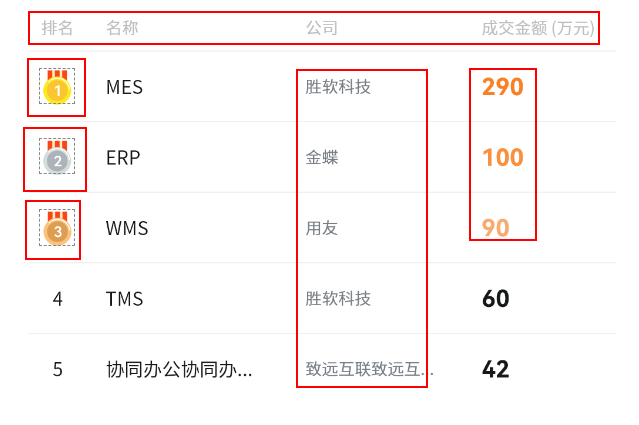
5、element 实现表格特殊单元格及表头样式的设置
<el-table
  :data="tableData"
  style="width: 100%"
  :cell-class-name="addClass"
  height="96%"
  :header-row-class-name="headerRowClass"
  :cell-style="cellStyle"
>
  <el-table-column type="index" label="排名" align="center"></el-table-column>
  <el-table-column prop="date" label="名称" show-overflow-tooltip>
  </el-table-column>
  <el-table-column prop="name" label="公司" show-overflow-tooltip>
  </el-table-column>
  <el-table-column prop="total" label="成交金额(万元)"> </el-table-column>
</el-table>

<script>

  methods:{
      addClass({ row, column, rowIndex, columnIndex }) {
          if (rowIndex === 0 && columnIndex === 0) return "first-row";
          if (rowIndex === 0 && columnIndex === 3) return "first-row-total";
          if (rowIndex === 1 && columnIndex === 0) return "second-row";
          if (rowIndex === 1 && columnIndex === 3) return "second-row-total";
          if (rowIndex === 2 && columnIndex === 0) return "three-row";
          if (rowIndex === 2 && columnIndex === 3) return "three-row-total";
      },
          headerRowClass({ row, rowIndex }) {
              console.log("1", row, rowIndex);
              return "header-row-class";
          },
              cellStyle({ row, column, rowIndex, columnIndex }) {
                  if (columnIndex == 2)
                      return "fontFamily:Source Han Sans CN;color:#777e85;fontSize:10px";
              },
  }
</script>

<style lang="less" scoped>
  /deep/ .first-row {
    background: url("~@static/img/workspace/console_yunying_num1@2x.png")
      no-repeat center center;
    background-size: 56% 66%;
    .cell div {
      display: none;
    }
  }
  /deep/ .second-row {
    background: url("~@static/img/workspace/console_yunying_num2@2x.png")
      no-repeat center center;
    background-size: 56% 66%;
    .cell div {
      display: none;
    }
  }
  /deep/ .three-row {
    width: 30px;
    height: 30px;
    background: url("~@static/img/workspace/console_yunying_num3@2x.png")
      no-repeat center center;
    background-size: 56% 66%;
    .cell div {
      display: none;
    }
  }

  /deep/ .three-row-total,
  /deep/ .second-row-total,
  /deep/ .first-row-total {
    font-family: HarmonyOS Sans SC;
    font-weight: 700;
    color: #fe801f;
  }

  /deep/ .header-row-class {
    font-family: Source Han Sans CN;
    color: #bfbfbf;
    font-size: 12px;
  }
</style>
效果图:
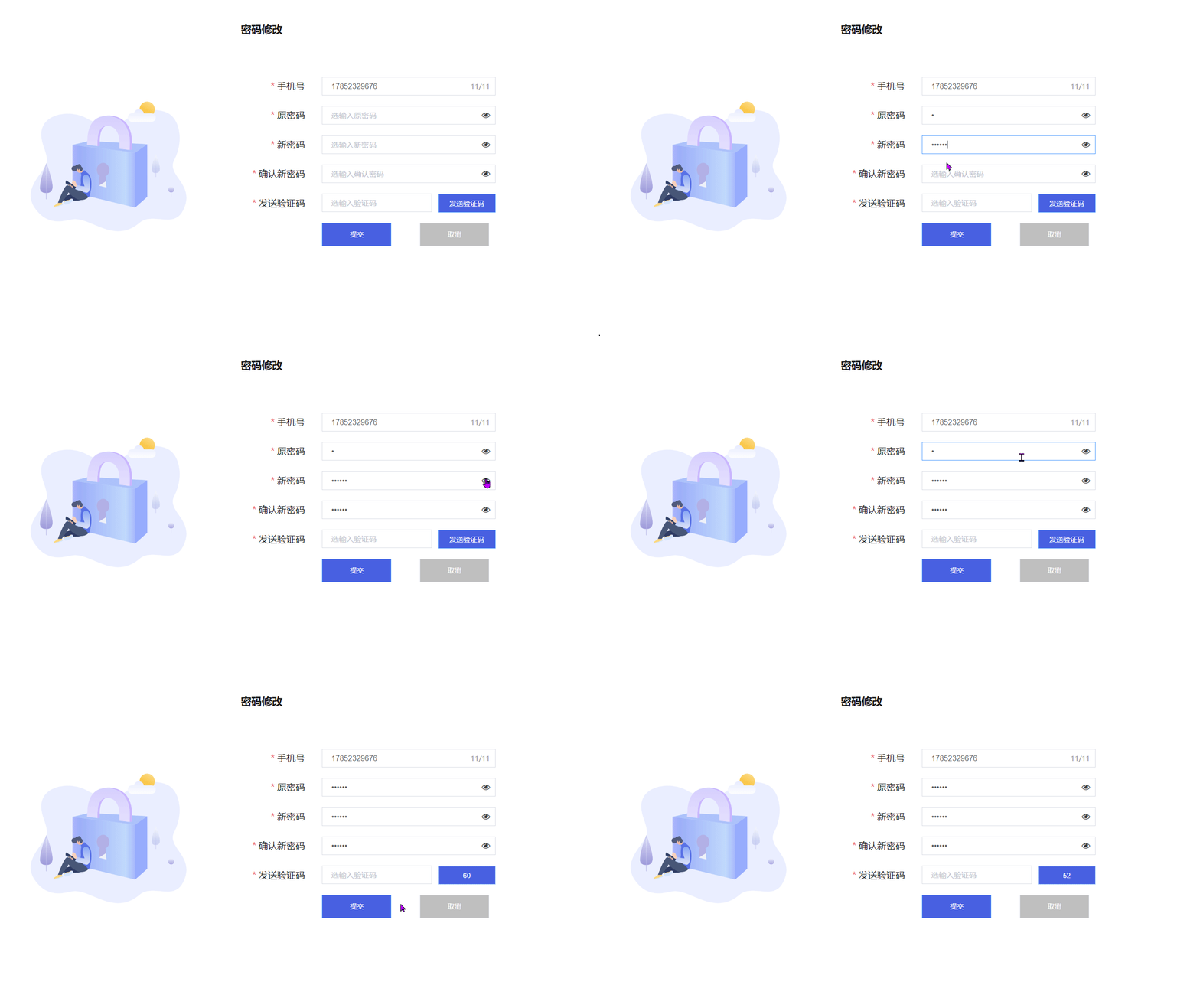
6、密码修改
<el-form
  ref="form"
  :model="accountFormData"
  label-width="140px"
  size="small"
  :rules="rules"
>
  <el-form-item label="手机号" prop="mobile">
    <el-input
      placeholder="选输入手机号"
      v-model="accountFormData.mobile"
      maxlength="11"
      show-word-limit
      style="width: 100%;"
    ></el-input>
  </el-form-item>
  <el-form-item label="原密码" prop="oldPassword">
    <el-input
      placeholder="选输入原密码"
      v-model="accountFormData.oldPassword"
      :type="passwordMap.oldPassword?'text':'password'"
      maxlength="40"
      style="width:100%"
    ></el-input>
    <div
      :class="{right_btn:true, isShow: passwordMap.oldPassword}"
      @click="changeShow('oldPassword')"
    >
      <i class="fa fa-eye"></i>
      <i class="fa fa-eye-slash"></i>
    </div>
  </el-form-item>
  <el-form-item label="新密码" prop="rpassword">
    <el-input
      placeholder="选输入新密码"
      v-model="accountFormData.rpassword"
      :type="passwordMap.rpassword?'text':'password'"
      maxlength="40"
      style="width:100%"
    ></el-input>
    <div
      :class="{right_btn:true, isShow:passwordMap.rpassword}"
      @click="changeShow('rpassword')"
    >
      <i class="fa fa-eye"></i>
      <i class="fa fa-eye-slash"></i>
    </div>
  </el-form-item>
  <el-form-item label="确认新密码" label-width="140px" prop="rppassword">
    <el-input
      placeholder="选输入确认密码"
      v-model="accountFormData.rppassword"
      :type="passwordMap.rppassword?'text':'password'"
      maxlength="40"
      style="width:100%"
    ></el-input>
    <div
      :class="{right_btn:true, isShow: passwordMap.rppassword}"
      @click="changeShow('rppassword')"
    >
      <i class="fa fa-eye"></i>
      <i class="fa fa-eye-slash"></i>
    </div>
  </el-form-item>
  <el-form-item label="发送验证码" label-width="140px" prop="verificationCode">
    <el-input
      placeholder="选输入验证码"
      v-model="accountFormData.verificationCode"
      maxlength="20"
      style="width: calc(100% - 110px);float: left;"
    ></el-input>
    <div style="margin-left:10px;width:100px;float:left;">
      <el-button
        style="width:100px;"
        type="primary"
        @click="checkUserandVerificationCode"
        :disabled="sffs"
        >{{fsyzm}}</el-button
      >
    </div>
  </el-form-item>

  <el-form-item class="btn">
    <el-button
      class="submit"
      type="primary"
      v-loading.fullscreen.lock="loading"
      @click="changePassword"
      style="margin-left:0px"
      >提交</el-button
    >
    <el-button class="cencel" @click="handleCencel">取消</el-button>
  </el-form-item>
</el-form>

<script>
  function isvalidPhone(str) {
    const reg = /^1[3|4|5|7|8][0-9]\d{8}$/;
    return reg.test(str);
  }

  const validPhone = (rule, value, callback) => {
    if (!value) {
      callback(new Error("请输入电话号码"));
    } else if (!isvalidPhone(value)) {
      callback(new Error("请输入正确手机号码"));
    } else {
      callback();
    }
  };
  export default {
    data() {
      var validatePass = (rule, value, callback) => {
        if (value === "") {
          callback(new Error("请输入密码"));
        } else {
          if (this.accountFormData.rppassword !== "") {
            this.$refs.accountFormData.validateField("checkPass");
          }
          callback();
        }
      };
      var validatePass2 = (rule, value, callback) => {
        if (value === "") {
          callback(new Error("请再次输入密码"));
        } else if (value !== this.accountFormData.rpassword) {
          callback(new Error("两次输入密码不一致!"));
        } else {
          callback();
        }
      };
      return {
        loading: false,
        fsyzm: "发送验证码",
        sffs: false,
        countdown: 60,
        accountFormData: {
          mobile: "",
          oldPassword: "",
          rpassword: "",
          rppassword: "",
          verificationCode: "",
        },
        passwordMap: {
          oldPassword: false,
          rpassword: false,
          rppassword: false,
        },
        rules: {
          mobile: [
            { required: true, message: "请输入手机号", trigger: "blur" },
            {
              required: true,
              message: "请输入正确格式的手机号",
              trigger: "blur",
              validator: validPhone,
            },
          ],
          oldPassword: [
            { required: true, message: "请输入旧密码", trigger: "blur" },
          ],
          rpassword: [
            { required: true, validator: validatePass, trigger: "blur" },
          ],
          rppassword: [
            { required: true, validator: validatePass2, trigger: "blur" },
          ],
          verificationCode: [
            { required: true, message: "请输入验证码", trigger: "blur" },
          ],
        },
      };
    },
    methods: {
      settime() {
        if (this.countdown == 0) {
          this.sffs = false;
          this.fsyzm = "获取验证码";
          this.countdown = 60;
          return;
        } else {
          this.sffs = true;
          this.fsyzm = "重新发送(" + this.countdown + ")";
          this.fsyzm = this.countdown--;
        }
        let _this = this;
        setTimeout(function () {
          _this.settime();
        }, 1000);
      },
      changeShow(key) {
        this.passwordMap[key] = !this.passwordMap[key];
      },
      checkUserandVerificationCode() {
        if (
          this.accountFormData.mobile != this.auth.getPermission().userMobile
        ) {
          this.$message({
            type: "warning",
            message: "该用户手机号与当前手机号不匹配!",
          });
          return false;
        }
        console.log(this.auth.getPermission());
        this.accountFormData.userName = this.auth.getPermission().entUserName;
        this.$axios
          .post(this.api.user.sendVerifyCode(), this.accountFormData)
          .then((res) => {
            this.commonGetResData(res).then((data) => {
              this.settime();
            });
          });
      },
    },
  };
</script>

<style lang="less" scoped>
  .right_btn .fa-eye-slash {
    display: none;
  }
  .right_btn .fa-eye {
    display: inline;
    color: #333;
  }
  .isShow .fa-eye {
    display: none;
  }
  .isShow .fa-eye-slash {
    display: inline;
    color: #999;
  }
</style>
效果图:
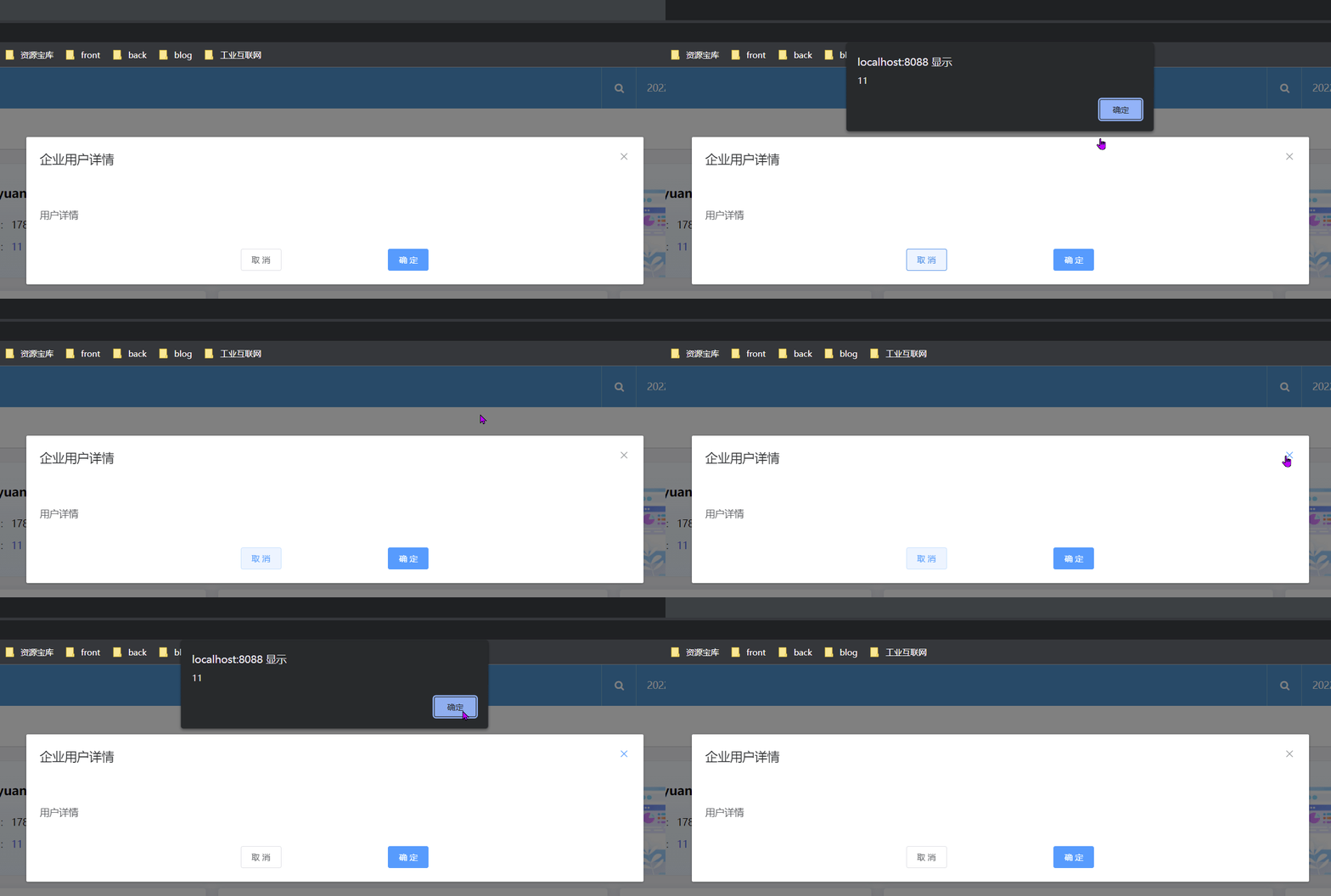
7、对 Elementui 中的 el-dialog 进行封装
<template>
  <el-dialog
    :visible.sync="dialogVisible"
    :title="title"
    :width="width"
    :fullscreen="fullscreen"
    :top="top"
    :modal="modal"
    :modal-append-to-body="modalAppendToBody"
    :append-to-body="appendToBody"
    :lock-scroll="lockScroll"
    :custom-class="customClass"
    :close-on-click-modal="closeOnClickModal"
    :close-on-press-escape="closeOnPressEscape"
    :show-close="showClose"
    :before-close="beforeClose"
    :center="center"
    @open="open"
    @opened="opened"
    @close="close"
    @closed="closed"
    :destroy-on-close="destroyOnClose"
    class="common_dialog"
  >
    <slot name="title" slot="title"></slot>
    <slot></slot>
    <slot name="footer" slot="footer" class="dialog-footer">
      <el-row>
        <el-col :span="6" :offset="6" style="text-align: center">
          <el-button class="cancel_border_btn" @click="cancel">取 消</el-button>
        </el-col>
        <el-col :span="6" style="text-align: center">
          <el-button class="submit_btn" type="primary" @click="submit"
            >确 定</el-button
          >
        </el-col>
      </el-row>
    </slot>
  </el-dialog>
</template>

<script>
  export default {
    name: "commonDialog",
    props: {
      visible: {
        type: Boolean,
        default: false,
      },
      title: {
        type: String,
        default: "提示",
      },
      width: {
        type: String,
        default: "50%",
      },
      fullscreen: {
        type: Boolean,
        default: false,
      },
      top: {
        type: String,
        default: "15vh",
      },
      modal: {
        type: Boolean,
        default: true,
      },
      modalAppendToBody: {
        type: Boolean,
        default: true,
      },
      appendToBody: {
        type: Boolean,
        default: false,
      },
      lockScroll: {
        type: Boolean,
        default: true,
      },
      customClass: {
        type: String,
        default: "",
      },
      closeOnClickModal: {
        type: Boolean,
        default: true,
      },
      closeOnPressEscape: {
        type: Boolean,
        default: true,
      },
      showClose: {
        type: Boolean,
        default: true,
      },
      beforeClose: {
        type: Function,
        default: () => {},
      },
      center: {
        type: Boolean,
        default: false,
      },
      destroyOnClose: {
        type: Boolean,
        default: false,
      },
    },
    data() {
      return {
        dialogVisible: false,
      };
    },
    watch: {
      visible: {
        handler(v) {
          this.dialogVisible = v;
        },
        deep: true,
      },
    },
    created() {
      this.dialogVisible = this.visible;
    },
    methods: {
      cancel() {
        this.$emit("cancel");
      },
      submit() {
        this.$emit("submit");
      },
      open() {
        this.$emit("open");
      },
      opened() {
        this.$emit("opened");
      },
      close() {
        this.cancel();
        this.$emit("close");
      },
      closed() {
        this.$emit("closed");
      },
    },
  };
</script>

<style scoped></style>
简单使用:
<commonDialog
  title="企业用户详情"
  class="common_dialog"
  :visible.sync="dialogVisible"
  width="900px"
  top="10vh"
  :close-on-click-modal="false"
  @cancel="closeDialog"
  @submit="submitDialog"
  :before-close="closeDialog"
>
  <el-row style="padding-top:20px;">
    <el-col :span="24">
      <div class="title_box">用户详情</div>
    </el-col>
    <el-col :span="2"></el-col>
  </el-row>
</commonDialog>

<script>
  import commonDialog from "../../components/private/commonDialog";
  export default {
      components: {
          commonDialog,
      },
      data(){
          return{
              dialogVisible: true,
          }
      }
      methods:{
      closeDialog() {
          alert("11");
      },
  }
  }
</script>
效果图:
8、vue 中的 extends 使用
vue 的 extends 和 mixins 类似,通过暴露一个 extends 对象到组件中使用。
extends 会比 mixins 先执行。执行顺序:extends > mixins > 组件
extends 只能暴露一个 extends 对象,暴露多个 extends 不会执行
test.js:
//暴露两个mixins对象
export const mixinsTest = {
  methods: {
    hello() {
      console.log("hello mixins");
    },
  },
  beforeCreate() {
    console.log("混入的beforeCreated");
  },
  created() {
    this.hello();
  },
};

export const mixinsTest2 = {
  methods: {
    hello2() {
      console.log("hello2");
    },
  },
  created() {
    this.hello2();
  },
};

//只能使用一个extends对象,多个无效,extends会先于mixins执行
export const extendsTest = {
  methods: {
    hello3() {
      console.log("hello extends");
    },
  },
  beforeCreate() {
    console.log("extends的beforeCreated");
  },
  created() {
    this.hello3();
  },
};
vue组件
<template>
  <div>home</div>
</template>
<script>
  import { mixinsTest, mixinsTest2, extendsTest } from "../util/test.js";
  export default {
    name: "Home",
    data() {
      return {};
    },
    beforeCreate() {
      console.log("组件的beforeCreated");
    },
    created() {
      console.log("1212");
    },
    mixins: [mixinsTest2, mixinsTest], // 先调用那个mixins对象,就先执行哪个
    extends: extendsTest, // 使用extends
  };
</script>
<style lang="css" scoped></style>
9、vue 实现某元素吸顶或固定位置显示(监听滚动事件)
<template>
  <CommonPage :options="pageOptions">
    <div
      slot="body"
      slot-scope="scope"
      class="expert-pool-wrapper"
      ref="scrollbody"
    >
      <div class="main">
        <div class="left-nav" :class="{'left-nav-fixed':searchBarFixed}">
          <ul>
            <li class="active"><span class="line"></span>新材料</li>
            <li><span class="line"></span>石油装备</li>
            <li><span class="line"></span>石油化工</li>
            <li><span class="line"></span>橡胶轮胎</li>
          </ul>
        </div>
      </div>
    </div>
  </CommonPage>
</template>
<script>
  data() {
      return {
          currentScroll: 0,
          searchBarFixed: false,

      };
  },
      methods: {
          handleScroll: function () {
              const scrollbody = this.$refs["scrollbody"];
              this.currentScroll = scrollbody.scrollTop;
              var offsetTop = document.querySelector(".left-nav").offsetTop;
              if (this.currentScroll > offsetTop) {
                  this.searchBarFixed = true;
              } else this.searchBarFixed = false;
          },
      },
          mounted() {
              this.$nextTick(() => {
                  const scrollbody = this.$refs["scrollbody"];
                  scrollbody.addEventListener("scroll", this.handleScroll, true);
              });
          },
</script>
<style lang="less" scoped>
  .left-nav-fixed {
    position: fixed !important;
  }
  .left-nav {
    position: absolute;
    top: 230px;
    left: 0px;
    margin-right: 60px;
    z-index: 100;
    ul {
      border-right: 2px solid rgba(34, 79, 225, 0.12);
      .active {
        background-image: linear-gradient(
          89.05deg,
          rgba(255, 255, 255, 0) 0%,
          #e1e6f3 100%
        );
        font-family: Source Han Sans CN;
        color: #224fe1;
        font-size: 16px;
        .line {
          background-color: #224fe1;
          width: 36px;
        }
      }
      .line {
        width: 30px;
        height: 3px;
        background-color: #bebebe;
        display: inline-block;
        vertical-align: middle;
        margin-right: 15px;
      }
      li {
        width: 260px;
        line-height: 80px;
        text-align: center;
        font-family: Source Han Sans CN;
        color: #bebebe;
        font-size: 16px;
      }
    }
  }
</style>
效果展示: