工作中常用代码
一、代码相关
1.1、Java 方面相关
//获取当前用户id
RequestContext.getCurrentUser().getId()
//获取当前用户姓名
RequestContext.getCurrentUser().getUsername().toString()
//获取当前格式化的日期
SimpleDateFormat df = new SimpleDateFormat("yyyy-MM-dd HH:mm:ss");//设置日期格式
map.put("cjsj", df.format(new Date()));
//UUid生成
String zbId = IDUtils.getUUID32().toString();
//Json与map或list之间的转换
private static final Moshi moshi = new Moshi.Builder().build(); // json utll
private static final JsonAdapter<Map> mapAdapter = moshi.adapter(Map.class);
private static final JsonAdapter<List> listAdapter = moshi.adapter(List.class);


//分页查询
public DataPaging querySupplyCollectList(Map params) {
    int _page = 1;
    int _rows = 2147483647;
    if(params.get("page")!=null && params.get("rows")!=null){
        _page = Integer.parseInt(params.get("page").toString());
        _rows = Integer.parseInt(params.get("rows").toString());
    }
    PageRequest pageRequest= new PageRequest(_page,_rows,params);
    DataPaging supplyCollectList = mybatisRepository.selectPaging(MAPPER+"querySupplyCollectList",pageRequest);
    return supplyCollectList;
}
1.1.1、后台完整的增删改查接口请求结构
1、controller 层
package com.ly.business.coal.controller;
import cn.com.victorysoft.vseaf.core.mybatis.paging.bean.DataPaging;
import cn.com.victorysoft.vseaf.core.web.http.JsonMessage;
import com.ly.business.coal.entity.TableDicEntity;
import com.ly.business.coal.service.TableDicService;
import io.swagger.annotations.Api;
import io.swagger.annotations.ApiOperation;
import org.springframework.beans.factory.annotation.Autowired;
import org.springframework.web.bind.annotation.*;

import java.util.Map;

@Api(value = "表格字典管理controller", tags = "表格字典管理controller")
@RestController
@RequestMapping(value = "/tabledic")
public class TableDicController {
    @Autowired
    private TableDicService tableDicService;
    @PostMapping("/saveTableInfo")
    public JsonMessage saveTableInfo(@RequestBody TableDicEntity tableDicEntity){
        try {
            tableDicService.saveTableInfo(tableDicEntity);
            return new JsonMessage().success();
        } catch (Exception e) {
			e.printStackTrace();
            return new JsonMessage().failure("数据查询失败");
        }
    }


    @PostMapping("/getTableInfo")
    @ApiOperation(value = "分页查询获取字典表格信息列表")
    public JsonMessage getTableInfo(@RequestBody Map params){
        try{
            DataPaging<TableDicEntity> result=  tableDicService.getTableInfo(params);
            return new JsonMessage().success(result);
        } catch (Exception e) {
            e.printStackTrace();
            return new JsonMessage().failure("数据保存失败");
        }
    }


    @GetMapping("/delTableById/{id}")
    @ApiOperation(value = "通过id删除")
    public JsonMessage delTableById(@PathVariable("id") String id){
        try{
            tableDicService.delTableById(id);
            return new JsonMessage().success();
        } catch (Exception e) {
            e.printStackTrace();
            return new JsonMessage().failure("数据保存失败");
        }
    }

    @PostMapping("/editTableInfo")
    @ApiOperation(value = "更新")
    public JsonMessage editTableInfo(@RequestBody  TableDicEntity tableDicEntity){
        try{
            tableDicService.editTableInfo(tableDicEntity);
            return new JsonMessage().success();
        } catch (Exception e) {
            e.printStackTrace();
            return new JsonMessage().failure("数据保存失败");
        }
    }

}
2、service 层
package com.ly.business.coal.service;

import cn.com.victorysoft.vseaf.core.mybatis.paging.bean.DataPaging;
import cn.com.victorysoft.vseaf.core.mybatis.paging.bean.PageRequest;
import cn.com.victorysoft.vseaf.core.repository.MybatisRepository;
import cn.com.victorysoft.vseaf.core.util.IDUtils;
import cn.hutool.db.meta.Table;
import com.ly.business.coal.entity.TableDicEntity;
import org.springframework.stereotype.Service;
import org.springframework.transaction.annotation.Transactional;

import javax.annotation.Resource;
import java.util.Map;

@Service
public class TableDicService {
   @Resource
   private MybatisRepository mybatisRepository;
   private final String MAPPER = "com.ly.business.TableDicMapper.";
    private String mapper(String param) {
        return MAPPER + param;
    }
    public void saveTableInfo(TableDicEntity tableDicEntity){
        tableDicEntity.setId(IDUtils.getUUID32());
        mybatisRepository.insert(MAPPER+"saveTableInfo",tableDicEntity);
    }
    @Transactional
    public void editTableInfo(TableDicEntity tableDicEntity){
        mybatisRepository.insert(MAPPER+"editTableInfo",tableDicEntity);
    }

    public DataPaging getTableInfo(Map params) {
        int _page = 1;
        int _rows = 2147483647;
        if(params.get("page")!=null && params.get("rows")!=null){
            _page = Integer.parseInt(params.get("page").toString());
            _rows = Integer.parseInt(params.get("rows").toString());
        }
        PageRequest pageRequest= new PageRequest(_page,_rows,params);
        return mybatisRepository.selectPaging(MAPPER+"getTableInfo",pageRequest);
    }

    public void delTableById(String id) {
        mybatisRepository.delete(MAPPER+"delTableById", id);
    }

}
3、对应实体类
package com.ly.business.coal.entity;

import com.fasterxml.jackson.annotation.JsonFormat;
import io.swagger.annotations.ApiModelProperty;
import lombok.Data;
import org.springframework.format.annotation.DateTimeFormat;

import java.time.LocalDateTime;
import java.util.Date;

@Data
public class TableDicEntity {
    /** 主键ID */
    @ApiModelProperty(name = "主键ID",notes = "")
    private String id ;
    /** 表格内容 */
    @ApiModelProperty(name = "表格内容",notes = "")
    private String dicContent ;
    /** 表格描述 */
    @ApiModelProperty(name = "表格描述",notes = "")
    private String dicText ;
    /** 表格类型 */
    @ApiModelProperty(name = "表格类型",notes = "")
    private String dicTypeCode ;
    /** 表格类型名称 */
    @ApiModelProperty(name = "表格类型名称",notes = "")
    private String dicTypeName ;
    /** 备注 */
    @ApiModelProperty(name = "备注",notes = "")
    private String remerk ;
    /** 创建时间 */
    @ApiModelProperty(name = "创建时间",notes = "")
    @DateTimeFormat(pattern = "yyyy-MM-dd HH:mm:ss")
    @JsonFormat(pattern = "yyyy-MM-dd HH:mm:ss")
    private LocalDateTime createTime;
}
4、对应 Mapper.xml 文件
<?xml version="1.0" encoding="UTF-8" ?>
<!DOCTYPE mapper PUBLIC "-//mybatis.org//DTD Mapper 3.0//EN" "http://mybatis.org/dtd/mybatis-3-mapper.dtd">
<mapper namespace="com.ly.business.TableDicMapper">

    <select id="getTableInfo" resultType="com.ly.business.coal.entity.TableDicEntity" parameterType="map">
        select
        id,DIC_CONTENT,DIC_TEXT,DIC_TYPE_CODE,DIC_TYPE_NAME,REMERK,CREATE_TIME
        from table_dic
        <where>
            <if test="id != null and id != ''">
                and id = #{id}
            </if>
            <if test="dicContent != null and dicContent != ''">
                and DIC_CONTENT = #{dicContent}
            </if>
            <if test="dicText != null and dicText != ''">
                and DIC_TEXT LIKE CONCAT( "%", #{dicText}, "%" )
            </if>
            <if test="dicTypeCode != null and dicTypeCode != ''">
                and DIC_TYPE_CODE = #{dicTypeCode}
            </if>
            <if test="dicTypeName != null and dicTypeName != ''">
                and DIC_TYPE_NAME = #{dicTypeName}
            </if>
            <if test="remerk != null and remerk != ''">
                and REMERK = #{remerk}
            </if>
        </where>
    </select>
    <insert id="saveTableInfo"  parameterType="com.ly.business.coal.entity.TableDicEntity">
        insert into table_dic(id,DIC_CONTENT,DIC_TEXT,DIC_TYPE_CODE,DIC_TYPE_NAME,REMERK)
        values (#{id},#{dicContent},#{dicText},#{dicTypeCode},#{dicTypeName},#{remerk})
    </insert>
    <!-- 更新数据 -->
    <update id="editTableInfo" parameterType="com.ly.business.coal.entity.TableDicEntity">
        update table_dic
        <set>
            <if test="id != null and id != ''">
                id = #{id},
            </if>
            <if test="dicContent != null and dicContent != ''">
                DIC_CONTENT = #{dicContent},
            </if>
            <if test="dicText != null and dicText != ''">
                DIC_TEXT = #{dicText},
            </if>
            <if test="dicTypeCode != null and dicTypeCode != ''">
                DIC_TYPE_CODE = #{dicTypeCode},
            </if>
            <if test="dicTypeName != null and dicTypeName != ''">
                DIC_TYPE_NAME = #{dicTypeName},
            </if>
            <if test="remerk != null and remerk != ''">
                REMERK = #{remerk},
            </if>
        </set>
        where id = #{id}
    </update>
    <!--通过主键删除-->
    <delete id="delTableById" parameterType="string">
        delete from table_dic where id = #{id}
    </delete>

</mapper>
1.2、Mysql 方面相关
//遍历插入数据
<insert id="inserXmNdtz" parameterType="java.util.List">
    insert into t_xm_ndtz (xmbm,nd,ndjhtz,cjsj)
    values
    <foreach collection="list" item="item" separator=",">
        (#{item.xmbm},#{item.nd},#{item.ndjhtz},now())
    </foreach>
</insert>

<insert id="inserXmNdtz" parameterType="java.util.List">
    INSERT INTO gwh_wlw_data.hik_camera_lx (cameraid, lx)
    SELECT #{cameraid}, #{lx} FROM dual
    WHERE NOT EXISTS(SELECT 1 FROM gwh_wlw_data.hik_camera_lx WHERE cameraid=#{cameraid} and lx=#{lx})
</insert>
//模糊查询
<select id="getZbList" parameterType="map" resultType="map">
    select * from t_xm_zb z where 1 =1
    <if test="zbmc !=null and zbmc != ''">
        and z.zbmc LIKE CONCAT( "%", Upper( #{zbmc} ), "%" )
    </if>
</select>

//最近30天数据展示
SELECT DATE_ADD(CURDATE(), INTERVAL(CAST(-help_topic_id AS SIGNED INTEGER))DAY) DAY FROM mysql.help_topic WHERE help_topic_id  < 30 ORDER BY help_topic_id
二、服务器部署相关
2.1、进行服务器部署
2.1.1.进行命令执行
Linux常见命令

-- 将某个进程通过模糊查询显示出来
ps -ef | grep java:这个是搜索关键字
-- 杀死进程号
kill -9 pid号

-- 管委会日志启动
nohup java -jar vseaf-backend-starter-4.4.2.jar > /home/start.log &
-- 查看详细日志信息
tail -f /home/start.log
-- 启动nginx的步骤
1、fuser -k 8080/tcp
2、/usr/sbin/nginx -c /etc/nginx/nginx.conf


-- 管委会后台启动
java -javaagent: vseaf-backend-starter-4.4.2.jar &
-- 查找文件
find / -name vseaf-backend-starter-4.4.2.jar


--开启防火墙常见命令
--查询端口是否开放
firewall-cmd --query-port=8080/tcp
--开放80端口
firewall-cmd --permanent --add-port=8080/tcp
--重启防火墙
firewall-cmd --reload

Windows常用命令
netstat -ano | findstr "80"  //显示出80端口占用的详细情况
tasklist | findstr "680"    //查询端口具体哪个应用占用
taskkill /f /t /im 程序名     //杀死程序进程
taskkill /pid 2604 -t -f    //杀死对应的进程号


地图相关配置
>>map       解压
7za x map_8.zip -r -o./map_8
>>map_8   启动
chmod u+x start
ps -ef|grep start    >>./start
kill -9 xxxxx

screen -S map8
./start
2.1.2、工业互联网相关
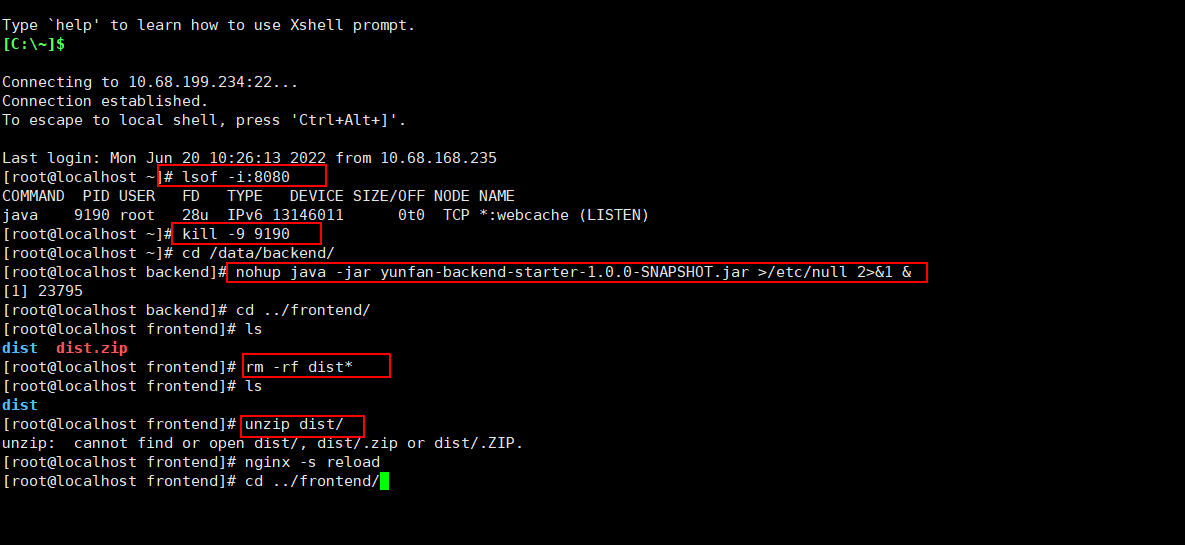
lsof -i:8080 #查看端口被谁占用
kill -9 9190 #杀死被占用端口号的pid
cd /data/backend/ #进入存储项目的文件夹

#0:表示键盘输入(stdin)
#1:表示标准输出(stdout),系统默认是1
#2:表示错误输出(stderr)
#command >/dev/null 2>&1 &  == command 1>/dev/null 2>&1 &
#1)command:表示shell命令或者为一个可执行程序
#2)>:表示重定向到哪里
#3)/dev/null:表示Linux的空设备文件
#4)2:表示标准错误输出
#5)&1:&表示等同于的意思,2>&1,表示2的输出重定向等于于1
#6)&:表示后台执行,即这条指令执行在后台运行

#1>/dev/null:表示标准输出重定向到空设备文件,也就是不输出任何信息到终端,不显示任何信息。
#2>&1:表示标准错误输出重定向等同于标准输出,因为之前标准输出已经重定向到了空设备文件,所以标准错误输出也重定向到空设备文件。
#这条命令的意思就是在后台执行这个程序,并将错误输出2重定向到标准输出1,然后将标准输出1全部放到/dev/null文件,也就是清空.
#所以可以看出" >/dev/null 2>&1 "常用来避免shell命令或者程序等运行中有内容输出。

#后台启动jar包
nohup java -jar yunfan-backend-starter-1.0.0-SNAPSHOT.jar >/etc/null 2>&1 &
#带日志的启动方式
nohup java -jar yunfan-starter-1.0-SNAPSHOT.jar > out.log 2>&1 &
cd ../frontend/ #进入前台项目的文件夹
rm -rf dist* #删除名称包含dist的文件夹
unzip dist.zip #解压dist文件压缩包
nginx -s reload #重启nginx